Social media integrations for channels, ads and tools
Connect once. PQZ keeps every account healthy.
Integrations has three tabs: Social accounts, Ad accounts and tracking, and Tools. PQZ asks only for the permissions it needs and warns you before a connection expires.
Broken connections are the quiet reason posts don't go out
Social platforms expire tokens, change permissions and log people out. A disconnected account doesn't announce itself; posts just stop, and you find out when someone asks why the feed went quiet.
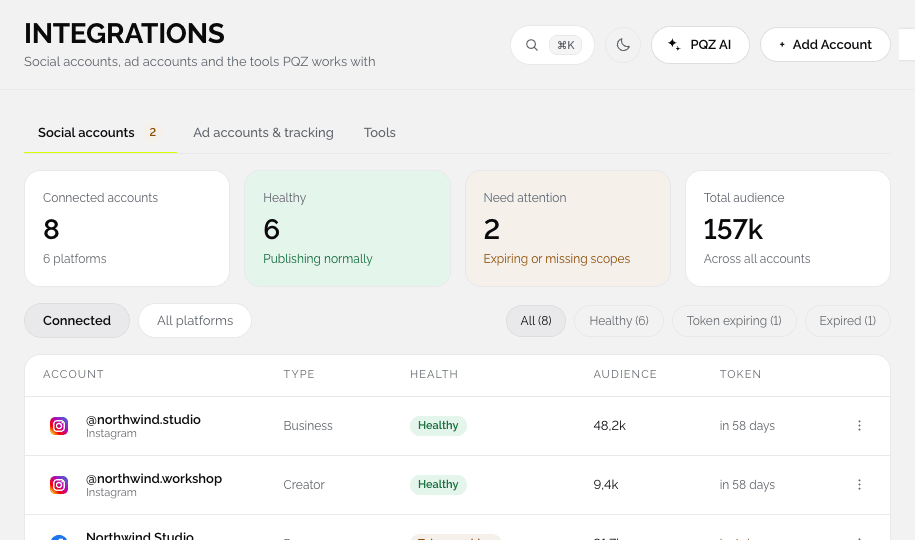
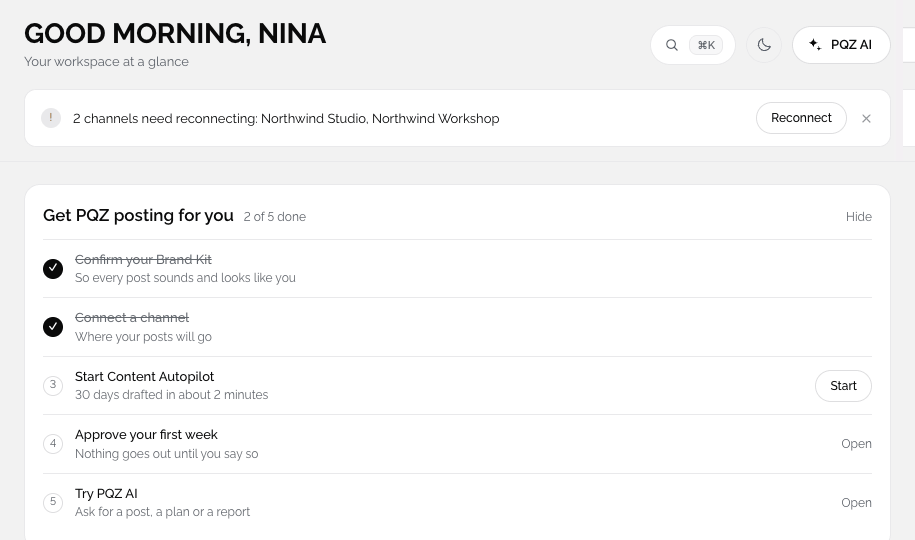
Integrations shows every connection with a health status in one table. PQZ warns you before a token expires and puts a Reconnect button on the dashboard banner, so fixing a connection takes seconds.
It also brings ads and tools into the same place. Your Meta ad account, Conversions API tracking and tools like Canva, Google Drive and Slack are connected from the same page, so the whole setup of your social operation is visible to the people who run it.
Connect ten channels once
Health status on every connection
Connect Instagram, Facebook, Threads, LinkedIn, Pinterest, Bluesky, Mastodon, Telegram, Discord and Tumblr. Most open the channel's own sign-in page; for Telegram and Discord you add the PQZ bot to your channel. Each account shows its health, and PQZ warns you before a connection expires.

Connected accounts for Harbour Café
Your Meta ad account and Conversions API
Ads and tracking in the same app as your posts
Connect a Meta ad account to create, launch and analyse ads in PQZ, and add the Conversions API so results are tracked accurately. Ads Overview then scores the account and lists what to fix.
The Harbour chair, made to order in four colours.

Run PQZ's AI on your own provider accounts
Your keys, your bill, no markup
In Settings › AI providers, choose My own API keys. Add OpenRouter for writing and images, fal.ai or Google AI Studio for video, and ElevenLabs for voices, then pick the model for each kind of work. For writing, Add custom provider takes any OpenAI-compatible API, like Groq, DeepSeek, Mistral, Together AI or your own server.
Work with Canva, Google Drive, Slack and more
Stable and beta integrations
Canva, Google Drive and Slack are stable. Shopify and Zapier are in beta, and HubSpot is planned. Bring designs in from Canva, pull files from Drive, and get approval requests in a Slack channel.
How to connect an account
About a minute per account.
Pick a channel
Choose one of ten social channels, your Meta ad account or a tool.
Sign in on the channel's page
You log in on the channel's own sign-in page, never in PQZ.
Grant only what is needed
Publish, read insights and manage comments or reviews.
Watch its health
Health shows in Integrations and on the dashboard, with Reconnect when needed.
What you can connect
Social accounts, ad accounts and tools.
Instagram and Facebook
Publishing, insights, comments and messages.
Threads
Text, image and carousel posts.
Posts on personal profiles.
Pins and video Pins.
Bluesky and Mastodon
Posts and threads on open networks.
Telegram and Discord
Posts to your community channels.
Tumblr
Text, photo and video posts.
Coming soon
TikTok, YouTube, LinkedIn company pages and Google Business Profile.
Meta ad accounts
Ads Overview, Ads Manager and Create Ad, with Conversions API for tracking.
Canva and Google Drive
Import templates and pull approved photos from a shared folder.
Slack
Approval requests and failure alerts in a channel.
Shopify and Zapier (beta)
Sync products so captions quote the live price, and trigger PQZ from other tools.
How PQZ looks after your connections
Only the permissions PQZ needs
PQZ asks for permission to publish, read insights and manage comments or reviews. You grant them on the channel's own page, and you can disconnect at any time.
Warnings before anything breaks
Every account shows its health. When a token is close to expiring or a channel needs you to sign in again, the dashboard shows which accounts need reconnecting and a Reconnect button.
API and webhooks for your stack
On Agency, API keys (read only or read and write) and webhooks for post.published, post.failed and post.approved connect PQZ to your other systems. Failed webhook deliveries are retried five times.
Tools you already use
Canva imports brand templates and exports finished designs into PQZ. Google Drive pulls approved photos from a shared folder. Slack posts approval requests and failure alerts to a channel. HubSpot is planned, to attribute leads to the post that produced them.
Common setups
Three ways teams connect PQZ.
Ten channels, one calendar
Connect Instagram, Facebook, LinkedIn, Pinterest and the rest, and publish to all of them from one calendar.
Organic and paid together
Connect your Meta ad account to score it in Ads Overview and turn your best posts into ads.
Alerts where you work
Connect Slack so approval requests and failures reach the right channel.
Connections, before and after PQZ
The same accounts, looked after.