AI website scan that builds your brand kit in two minutes
Type your website. Get your Brand Kit in about two minutes.
PQZ reads your public pages and finds your logo, colours, fonts, voice, products and facts, each with the page it came from. Nothing is published from a scan and nothing on your site changes.
Brand questionnaires take hours and still miss the details
Most tools start with a long form: describe your brand, upload your logo, list your products, pick a tone. It takes an afternoon, and the result is still a summary of what you remember, not what your website actually says to customers.
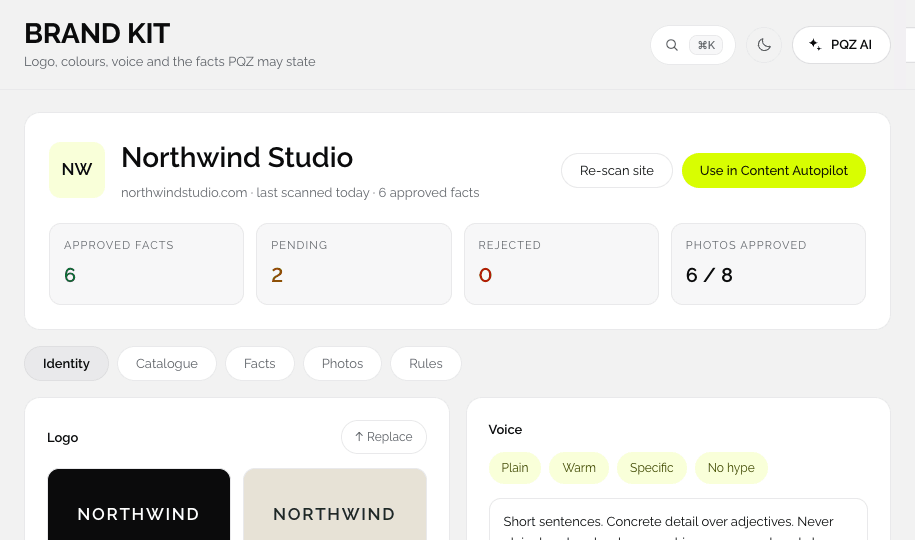
The website scan starts from the source customers already see. PQZ reads your home, product, about, blog and contact pages, and turns what it finds into a Brand Kit you can check in minutes. Every fact links back to its page, so you approve with the evidence in front of you.
Your Brand Kit, built from your website in about two minutes
You only type your website address
Type your address and PQZ reads your public pages: home, products, about, blog and contact. It pulls out your logo, colours, fonts, tone of voice, products and the facts you state, and lays them out for you to check.
You approve every fact before it is used
Nothing from a scan goes into a post on its own
Each fact is pending until you approve it. Edit the wording, reject what is out of date, or add facts a website cannot show, like a price list from a PDF. You can scan now and approve later.



Minutes after the scan, your first posts are ready
From facts to a first week of posts
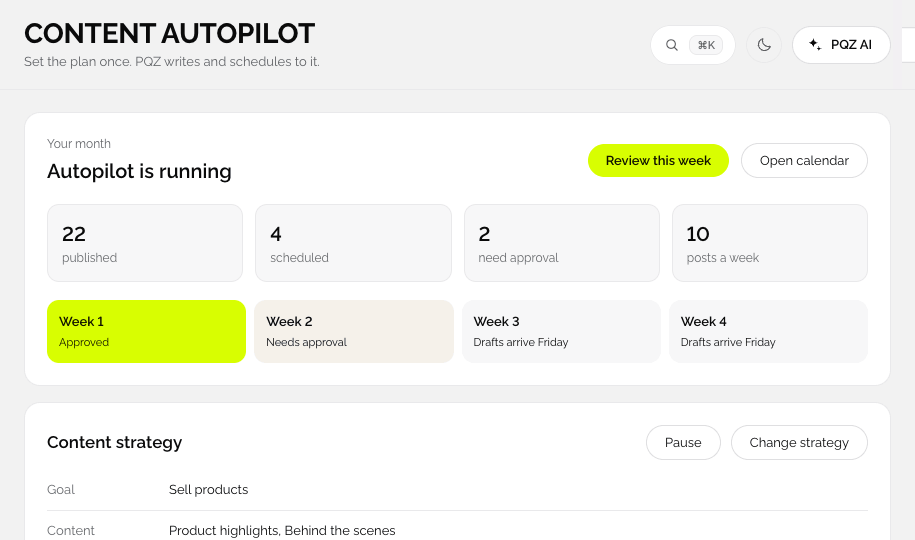
As soon as the Brand Kit is ready, PQZ drafts a first set of posts from what it found, in your voice and colours. Read them, approve the ones you like, and connect a channel to publish.





From web address to first drafts
The scan is the first step of every PQZ workspace.
Type your address
For example yourcompany.com. Nothing to install on your site, and PQZ never logs in to it.
PQZ reads your pages
About two minutes. It looks at public pages only.
Approve your Brand Kit
Keep, edit or remove the logo, colours, fonts, voice and each fact.
See first drafts
PQZ drafts posts in your brand so you see it working before you connect a channel.
What the scan finds
Public pages only. Everything is editable.
Logo
Found on your site and shown for you to confirm or replace.
Colours
The main colours of your site, with hex values.
Fonts
The typefaces your site uses, for posters and carousels.
Voice
How you write, from your own headlines and copy.
Products and services
Names, prices and descriptions from product and service pages.
Facts with sources
Short statements like opening hours or delivery terms, each linked to its page.
Locations and contact
From your contact page, for local posts and replies.
Topics
What you write about on your blog, used for post ideas.
Re-scan site
Run it again when your website changes. New facts wait for approval.
What happens to your site during a scan
Read-only, public pages only
PQZ reads the pages anyone can see in a browser. It does not log in, install anything or change your site, and nothing is published from a scan.
Nothing is used until you approve it
Everything the scan finds arrives as a suggestion. Facts wait as pending until you approve them, and only approved facts are used in posts, replies or ads.
Add what a website can't show
Price lists, brand guidelines and PDFs can be added after the scan. Each one adds facts with the document as their source.
Who starts with the website scan
Every PQZ workspace begins here.
See your brand through PQZ first
Scan, check the Brand Kit and read the first drafts before you connect a single channel.
Onboard a client in minutes
Create a workspace, scan the client's site and send the Brand Kit for review. See agencies.
Update everything at once
After a site relaunch, re-scan. New colours, fonts and facts wait for approval, then every new draft follows.
Setup, before and after the scan
The same brand, two ways of describing it.
Questions about Website scan
Does the scan change my website?
What if the scan gets something wrong?
How long does the scan take?
Can I re-scan later?
What if my site has no products?
Is the scan free?
Can I scan more than one website?
Which pages does the scan read?
Keep exploring PQZ
Type your website and see your Brand Kit and first drafts in minutes.