How to connect your website and run your first scan
The website scan builds your Brand Kit from your public pages in about two minutes. Here is how to run it and check what it found.
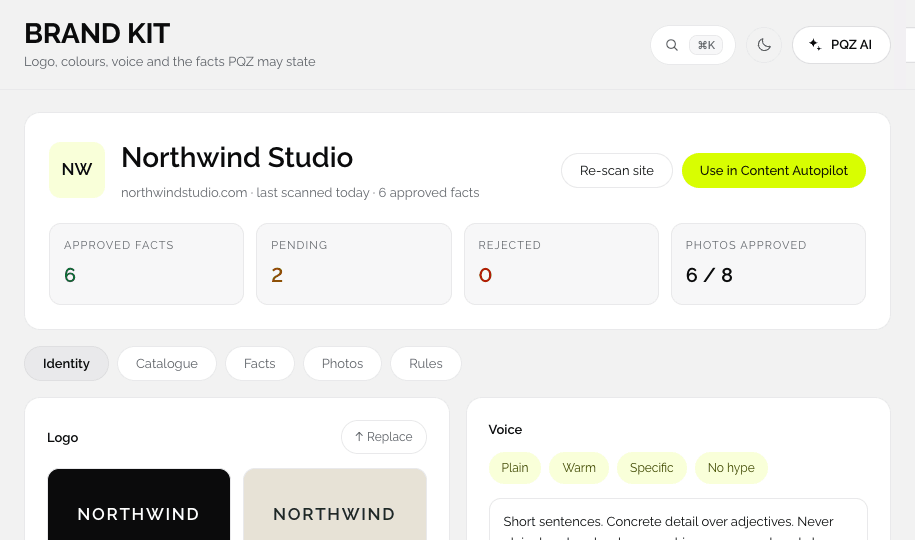
Run the scan
- Sign up and create your workspace.
- Type your website address, for example yourcompany.com. You do not need https:// or www.
- Wait about two minutes while PQZ reads your public pages.
- Open Set up › Brand Kit to see what it found.
What the scan reads
Public pages only: your home page, product and service pages, about page, blog and contact page, and other public pages linked from them. It does not log in, install anything or change your site.
Check what it found
- Logo, colours and fonts: confirm them or replace them with Replace.
- Voice: check the tone and add words PQZ must never use.
- Facts: each fact links to its page. Approve, edit or reject it. Only approved facts are used.
- Products and services: check names, prices and descriptions.
If something is missing or wrong
- Edit the item directly in the Brand Kit.
- Add documents, like a price list, to add facts a website cannot show.
- Update your website and choose Re-scan site. Changed facts arrive as pending.
Nothing from a scan is used until you approve it. You can scan, look around and approve later.