Why AI Social Media Tools Get Brand Facts Wrong
GUIDE

Why AI social media tools get brand facts wrong, and how to fix it

AI writing tools are fluent and confident, which is exactly the problem. Ask one to promote your product and it will happily invent a delivery window, a discount or a customer count.

7 min read · Brand Kit
PQZ · Set up › Brand Kit
Set up › Brand Kit

A social post is a public statement about your business. Customers screenshot it, quote it back to your support team and hold you to it. Every factual line in a post needs to trace back to something you can stand behind.

Three ways AI gets brand facts wrong

1. Invented specifics

Numbers are the first thing to drift. Free delivery appears where there is none, a two-year guarantee becomes five, and a founding date moves by a decade. Language models are trained to produce plausible text, and a plausible number is not the same as your number.

2. Facts that were true once

Offers end, prices change and opening hours move for the holidays. A tool that learned your brand once, from a document or a long prompt, keeps using the old version long after it stopped being true. The post reads well and quotes last season's sale.

3. Claims nobody approved

Some statements need a decision as well as a source: "the best in town", "clinically proven", "carbon neutral". Even if a page somewhere says it, someone in the business should decide whether social posts may repeat it.

What a brand fact needs

The fix is not better prompting. It is a source requirement. Before a tool can state something about your business, the fact behind it should have four properties:

  • It comes from a source you control, like your website or a document you uploaded.
  • You can see the exact page or document it came from.
  • Someone approved it for use in posts.
  • Change or remove it once and every new draft follows.

Everything else is a guess in a confident tone.

How PQZ handles brand facts

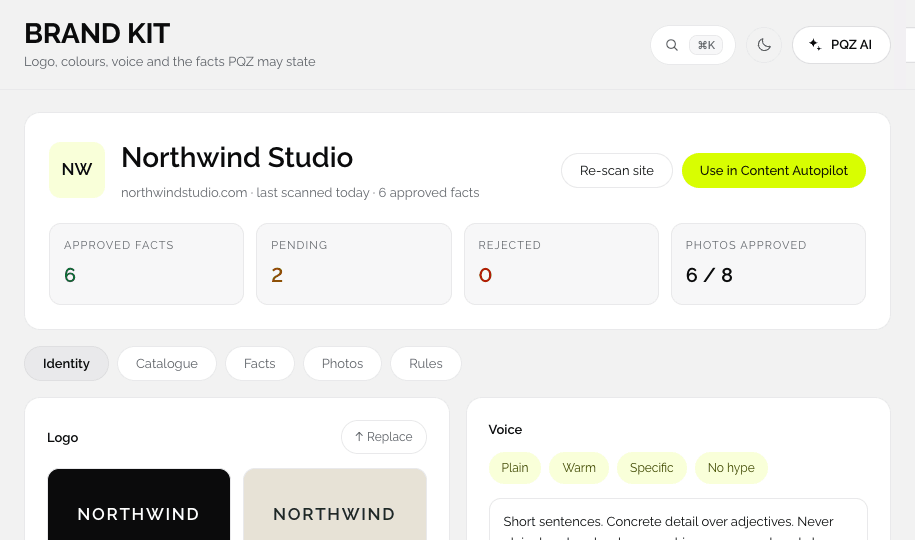
PQZ builds a Brand Kit from your website with the website scan. Every fact it finds arrives as pending, with the page it came from. You approve, edit or reject each one. Only approved facts are used in posts, replies and ads.

PQZ · Set up › Brand Kit
Brand Kit showing approved and pending facts

When a draft needs a fact you have not approved, PQZ asks you instead of writing one. When an offer ends, you update or remove the fact once, and every new draft from Content Autopilot, Social Inbox and Create Ad uses the change.

A simple checklist for any AI social tool

  1. Can it show where each fact in a post came from?
  2. Can you approve or reject facts before they are used?
  3. When you change a fact, do new drafts use the change straight away?
  4. Does it ask when a fact is missing, or does it guess?
  5. Does a person approve each post before it goes live?

If the answer to any of these is no, plan for someone to check every post by hand, and count that time as part of the tool's cost.

PQZ answers yes to all five. Every post waits in Approvals by default, so a person always has the last word.

What to do this week

  • List the ten facts customers ask about most: prices, delivery, returns, hours, guarantees.
  • Check that each one is written on your website, in the words you want used.
  • Remove or update anything out of date before you let any tool read the site.
  • Decide which claims need approval, and who approves them.

IN THE APP

How this looks in PQZ

APPROVED FACTS

Only facts you approved are ever stated

Every fact has a source and a status

Each fact PQZ finds arrives as pending with the page it came from. Approve, edit or reject it. Posts, replies and ads use approved facts only, and if a draft needs one you have not approved, PQZ asks you.

✓Source link on every fact
✓Pending, approved or rejected
✓Missing facts trigger a question, not a guess
northwindstudio.comScan my website
24 pages readAbout 2 minutes
Identity
N
Headings: Playfair · Body: Lato
WarmDirectCrafted
Facts found3 to review
Free delivery over $300
/delivery
Approved
Workshops every Saturday
/workshops
Pending
Spring sale 20% off
/sale
Pending
BRAND KIT

Everything PQZ knows about your brand

Logo, colours, fonts, voice, products and facts

The Brand Kit is built from your website and used by every feature: posts, images, videos, replies and ads. Change something once and every new draft follows.

✓Built from your website in about two minutes
✓Used by every feature in PQZ
✓Change once, every new draft follows
Voice
Warm and directAlways
Short sentencesAlways
"Cheap"Never
"Guaranteed"Never
Products
Harbour chair$240 · 4 colours
Studio stool$120 · oak or ash
Desk lamp$95 · black
Approved facts3 approved
Free delivery over $300northwindstudio.com/delivery
Approved
Made to order in 4 weeksnorthwindstudio.com/about
Approved
10-year frame guaranteenorthwindstudio.com/care
Approved
SUGGESTED REPLIES

Replies drafted from your approved facts

Fast answers that are also correct

Each suggested reply uses the same approved facts as your posts, so delivery times, prices and opening hours are right. If the answer needs a fact you have not approved, PQZ says so instead of guessing.

✓Source fact shown under every reply
✓Edit before sending, always
✓Asks when a fact is missing
Social InboxReviews
Mark D.1h
Lovely service, table arrived early.
Google review ★★★★★
Jo R.5h
Great chair, but delivery took longer than I expected.
Google review ★★★☆☆
Suggested replyFrom approved facts

Thank you, Mark. The team will be glad to hear it arrived early. Enjoy the table, and tag us if you share a photo.

Source: Voice · warm and direct
SendEdit
FAQ

Questions

Why do AI tools invent facts?

Language models are built to produce likely text. Without a required source, a likely number or claim can look exactly like a real one.

Can I stop PQZ using a fact?

Yes. Reject or remove it in the Brand Kit. Rejected facts are never used.

What if my website is out of date?

Update the page, then re-scan. Changed facts arrive as pending for you to approve.

Do replies in Social Inbox use the same facts?

Yes. Suggested replies use the same approved facts as posts and ads.

RELATED

Keep reading

Plan 30 days of posts in one sittingA repeatable monthly routine.READ GUIDE Choosing a way to workAutopilot, assisted or manual.READ GUIDE AI safetyHow PQZ keeps AI accurate.READ MORE
7 days free · No card needed

Scan your website and approve your brand facts in minutes.

START FREE

Facts you can stand behind