How to Plan 30 Days of Social Media Content in One Sitting
GUIDE

How to plan 30 days of social media content in one sitting

A repeatable routine for your first 30 days in PQZ, and every month after it: scan, plan, check, approve and publish.

8 min read · Content Autopilot
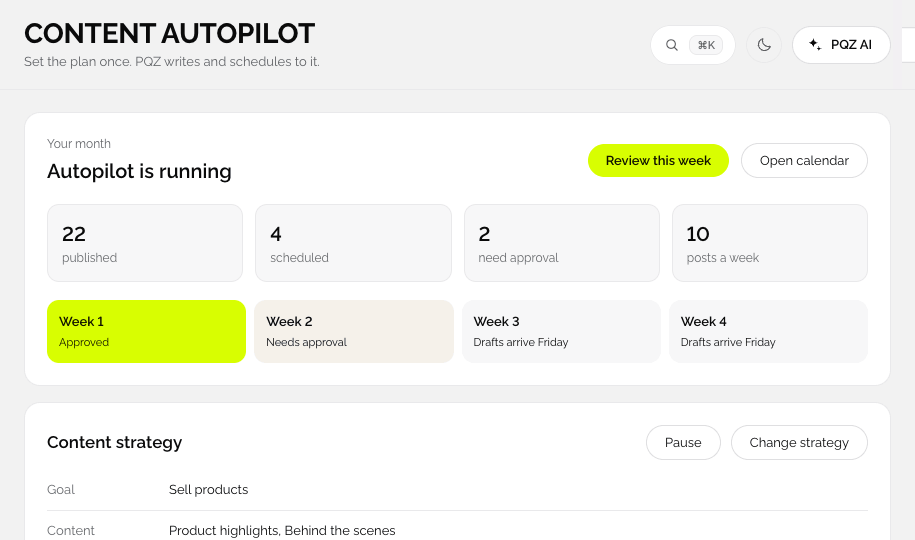
PQZ · Content Autopilot
Content Autopilot

Planning 30 days of social usually happens one post at a time, the night before. This guide turns it into one sitting at the start of the month. The first month takes about an hour including setup. After that, most of the time goes on reading and approving.

Before you start

  • Your website address, for the scan.
  • Logins for the channels you want to publish to.
  • A rough idea of how often you want to post, for example four times a week.
  • Any dates that matter this month: a sale, a launch, an event.

Step 1: Scan your website

Type your address. In about two minutes PQZ builds your Brand Kit: logo, colours, fonts, voice, products and facts. Go through the facts and approve the ones posts may use. This is the most important ten minutes of the month, because every draft is built from these facts.

Step 2: Set the plan in Content Autopilot

Content Autopilot walks through eight short steps: Brand kit, Goal and tone, Topics, Post types, Design, Schedule, Review and Publish.

  • Goal and tone: what the month is for, such as sales, followers or trust.
  • Topics: three to five themes, like products, tips, behind the scenes and proof.
  • Post types: the mix of Single Image, Carousel, Image as Reel and UGC Video.
  • Schedule: posts per week, channels and times. Turn on holidays if they matter.

Autopilot shows the total AI credits the month will use before you approve it. If it is more than you want, lower the frequency or use fewer video posts.
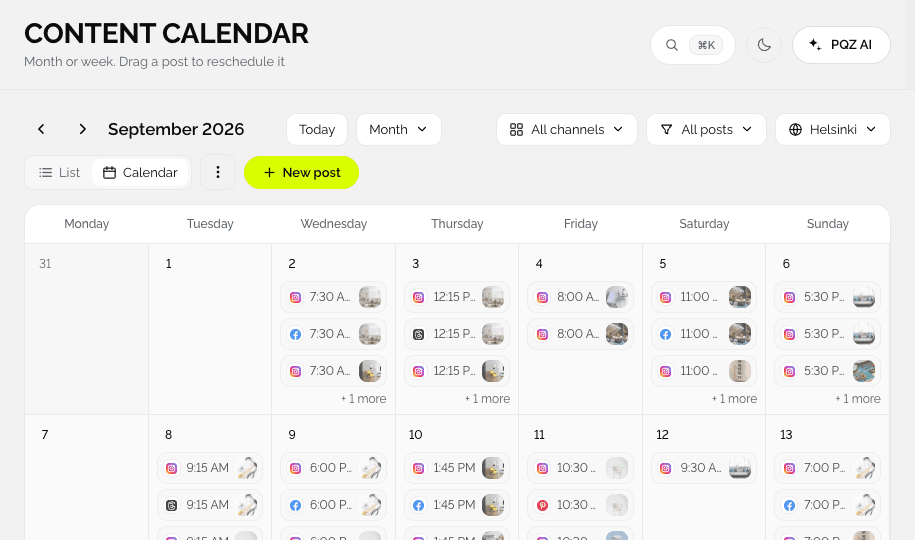
PQZ · Content › Content Calendar
Content Calendar with the drafted month

Step 3: Read the month as a whole

Open the 30-day preview or the Content Calendar. Before reading individual captions, look at the shape of the month:

  • Is there a good mix of topics, or too many product posts in a row?
  • Do the important dates have posts before them, as well as on the day?
  • Is each channel getting the formats it performs best with?

Fix the shape first. It is faster to move or swap a post than to rewrite five captions.

Step 4: Approve in one pass

Go to Approvals. Read each post as a customer would. Approve the ones that are ready, edit small things in place, and send anything that needs rework back with a note. When the month looks right, use Approve and schedule month.

If you need a second opinion, turn on Two approvers in Settings › Approvals. Posts then need a second sign-off before they are scheduled.

Step 5: Let it run, and check in weekly

PQZ publishes at the scheduled times and retries anything that fails. Once a week, spend ten minutes in Social Inbox clearing replies and a few minutes in Social Analytics looking at top posts.

Step 6: Plan next month from the results

At the end of the month, look at which topics and formats worked, adjust the plan, and draft the next month. The routine gets faster each time, because the Brand Kit and the plan are already there.

A monthly checklist

  1. Update facts that changed: prices, offers, hours.
  2. Adjust topics and post types from last month's results.
  3. Add this month's important dates.
  4. Draft the next 30 days and read it as a whole.
  5. Approve in one pass.
  6. Check Social Inbox and Social Analytics weekly.

IN THE APP

How this looks in PQZ

CONTENT AUTOPILOT

Set the plan once. Get 30 days of posts

Eight short steps, then the month is drafted

Choose your goal and tone, the topics you want to talk about, the post types and how often to post. Content Autopilot writes and designs every post for the month, places them on the calendar and shows the credit total before you approve.

✓Goal, tone, topics, post types and schedule
✓Holidays and awareness days added if you want them
✓Credit total shown before anything is made
1
Brand kitLogo, colours, voice and facts
Done
2
Goal and toneSales · warm and direct
Done
3
TopicsProducts, tips, workshop, reviews
Done
4
Post typesImage, carousel, reel, UGC video
Done
5
DesignBrand Kit style
Done
6
Schedule10 a week · 8 channels
Now
7
Review30-day preview
8
PublishAfter approval
POST TYPES

Choose the mix, see the cost

Four post types with clear credit costs

Single Image costs 1 credit, Image as Reel 2, Carousel 2 and UGC Video 4. Set how many of each you want per week and Content Autopilot balances them across channels, so the month is never all one format.

✓Single Image 1 · Carousel 2 · Image as Reel 2 · UGC Video 4
✓Mix set per week, spread across channels
✓Change the mix any month
October
48 posts · 8 channels
Approve month
MTWTFSS
1
2
Carousel
Carousel
3
Reel
4
5
6
Image
Image
7
8
UGC video
UGC video
9
10
Image
Image
11
12
13
Carousel
Carousel
14
15
Reel
Reel
16
17
Image
Image
18
19
20
Carousel
Carousel
21
22
UGC video
UGC video
23
24
Image
Image
25
26
27
Reel
Reel
28
Credits for this month312 of 600
REVIEW THE MONTH

Read the whole month before a single post goes live

30-day preview, then approve

Step seven shows every drafted post in order. Swap a topic, move a date, rewrite a caption or regenerate an image. When the month looks right, approve it in one pass and PQZ schedules everything.

✓30-day preview in calendar or list view
✓Edit or regenerate any single post
✓Approve and schedule the month at once
N
Northwind StudioInstagram · Oct 20 · 20:00
Post image

A calm bedroom starts with fewer, better pieces. Our oak bed frame, made to order.

Status
✓Drafted by Autopilot
2Needs approval
3Scheduled
Tom

Swap this to Oct 21, the 20th is a holiday post.

ApproveSend back
SOCIAL ANALYTICS

See what is working across every channel

Reach, engagement and best times in one view

Social Analytics shows reach, engagement, followers and clicks for every connected channel, with your top posts and the times your audience is most active. Compare periods to see whether this month beat the last.

✓All channels in one report
✓Top posts ranked by engagement
✓Best times per channel
Reach
48.2k
+12%
Engagement
3.9%
+0.6
Link clicks
1,284
+18%
Engagement by weekLast 90 days
Top post
Top post
Alder sofa launch carousel
5.8% engagement · 612 saves
FAQ

Questions

How long does the first month take?

About an hour including the website scan and connecting channels. Later months take less.

Do I need to connect channels first?

No. Scan and plan first, and connect channels before you approve.

What if I only want to post on two channels?

Choose only those channels in the Schedule step.

Which plan includes Content Autopilot?

Pro and Agency. See pricing.

RELATED

Keep reading

Getting brand facts rightWhy AI gets facts wrong.READ GUIDE Choosing a way to workAutopilot, assisted or manual.READ GUIDE Content AutopilotThe feature this guide uses.READ MORE
7 days free · No card needed

Scan your website and draft your first 30 days today.

START FREE

Your month, planned in one sitting