Autopilot, Assisted or Manual: Choosing How to Post
GUIDE

Autopilot, assisted or manual: how to choose for each channel

Not every channel needs the same amount of human writing. Here is how to decide where PQZ should plan and write, where it should only draft, and where you should write yourself.

6 min read · Ways to work
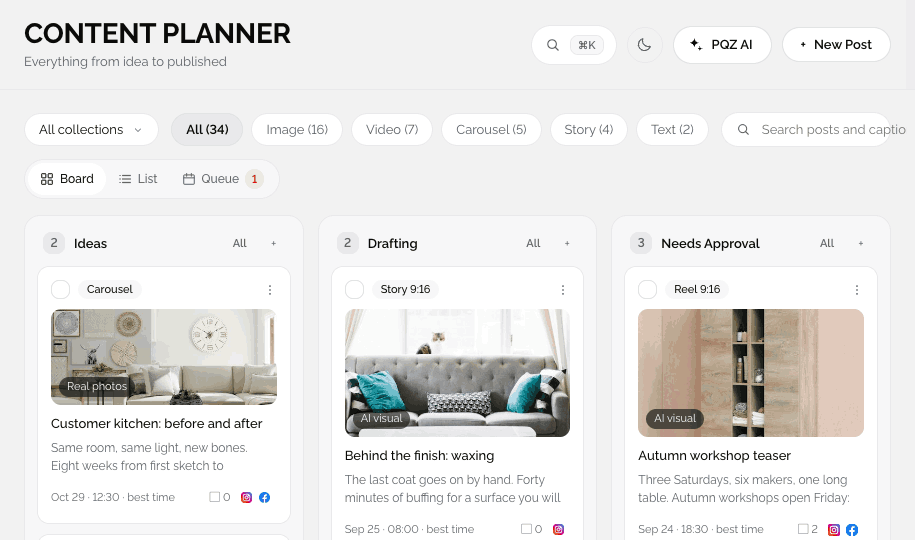
PQZ · Content › Content Planner
Content › Content Planner

PQZ supports three ways of working, and you can choose one per channel. Approval stays on in all three by default, so the choice is about who writes, not about who checks.

The three ways to work

Autopilot

Content Autopilot plans the next 30 days from your goal, topics, post types and schedule, then writes and designs every post. You approve. Best for channels that reward a steady rhythm.

Assisted

You decide the topics and add them to the Content Planner. PQZ drafts and designs each post in your voice. Best for channels where the idea matters more than the volume.

Manual

You write every post. PQZ handles timing, formats, retries, replies and reporting. Best for announcements, sensitive topics and personal accounts.

Four questions to decide

  1. How often does this channel need a post? Frequent and regular points to Autopilot.
  2. How much does the exact wording matter? High stakes points to assisted or manual.
  3. Who has the ideas? If your team has them, assisted turns them into posts quickly.
  4. How much time do you have? Little time points to Autopilot with a monthly approval.

Common setups

  • Local business: Autopilot on Instagram and Facebook, approved monthly.
  • B2B team: assisted on Threads from team topics, Autopilot elsewhere.
  • Regulated brand: manual or assisted writing with Two approvers on every post.
  • Founder account: manual, with PQZ handling scheduling and replies.
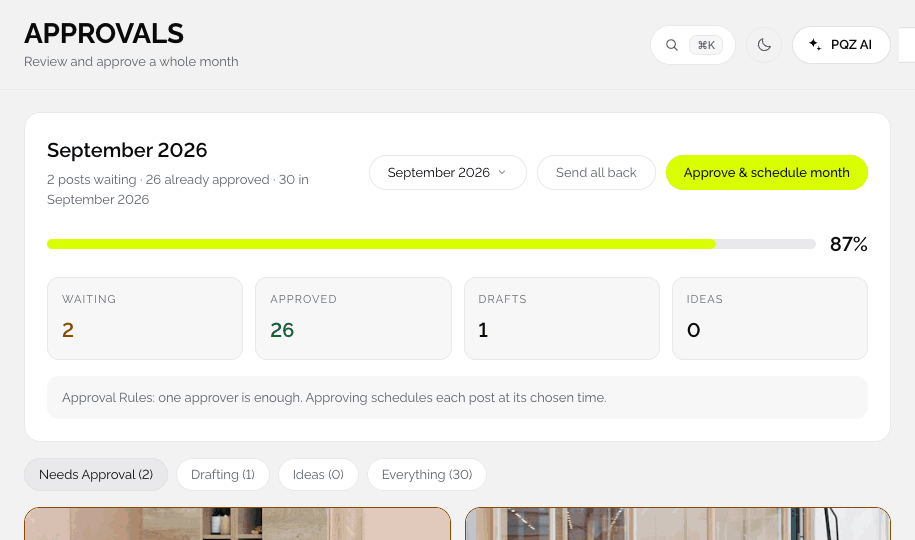
PQZ · Content › Approvals
Approvals with posts from Autopilot and from the team

Approval rules apply to every mode

Whatever the mode, posts follow the same rules in Settings › Approvals:

  • Require approval before publishing: nothing leaves Needs Approval on its own.
  • Two approvers: every post needs a second sign-off.
  • Auto-schedule on approval: approving puts the post in the queue at its time.

Start with Autopilot on every channel and approve everything for a month. Then move the channels where you want more say to assisted or manual. You can change modes at any time.

When to change modes

Revisit the choice when something changes: a channel starts to matter more, a campaign needs a specific voice, or your team has more or less time. Moving a channel from Autopilot to assisted, or back, does not change your calendar, approvals or reports.


IN THE APP

How each mode looks in PQZ

AUTOPILOT

PQZ plans and writes, you approve

For channels that reward a steady rhythm

Content Autopilot plans the next 30 days from your goal, topics and schedule, then writes and designs each post. Everything waits in Approvals until you say yes.

✓Plans and writes the whole month
✓You approve before anything is scheduled
✓Best for Instagram and Facebook
Autopilot · Instagram
16 posts this month
Approve month
MTWTFSS
1
Image
Image
2
3
Reel
4
5
6
Carousel
Carousel
7
8
Image
Image
9
10
UGC
UGC
11
12
13
Carousel
Carousel
14
15
Reel
Reel
16
17
Image
Image
18
19
20
Carousel
Carousel
21
22
Image
Image
23
24
UGC
UGC
25
26
27
Reel
Reel
28
All waiting for approval16 drafts
ASSISTED

You choose the topic, PQZ writes it

For channels where the idea matters most

Add an idea to the Content Planner and PQZ drafts the post in your voice with a matching image. You edit and approve. Good for Threads and for anything your team wants to shape.

✓Your idea, drafted in your voice
✓Image made to match
✓Edit freely before approval
N
Northwind StudioThreads · Wed 09:00
Post image

We moved our workshop to a solar-powered space this year. Here is what changed for the team and for the furniture.

Status
✓Idea from Nina
✓Drafted by PQZ
3Needs approval
4Scheduled
Nina

Add the number of panels, it is on the About page.

ApproveSend back
MANUAL

You write, PQZ handles the rest

For announcements and personal accounts

Write every word yourself. PQZ sizes it for each channel, publishes at the best time, retries on failure, collects replies and reports results.

✓Your words, unchanged
✓Timing, formats and retries handled
✓Replies and reports included
Post

A note from our founder on ten years of Northwind Studio.

PublishingManual
THThreadsMon 08:30Scheduled
FAFacebookMon 09:00Scheduled
INInstagramMon 12:00Scheduled
FAQ

Questions

Can I mix modes?

Yes. Each channel can use a different mode.

Is approval required in Autopilot?

By default, yes. Every post waits for a yes unless you change the approval rules.

Does manual mode use credits?

Only if you use AI features like Create Image.

Where do I choose the mode?

In Content Autopilot, choose which channels Autopilot plans for. Other channels are planned by you.

RELATED

Keep reading

Ways to workThe feature page.READ MORE Plan 30 days of posts in one sittingThe monthly routine.READ GUIDE ApprovalsRules for every mode.READ MORE
7 days free · No card needed

Try Autopilot for 7 days and switch channels whenever you like.

START FREE

Work the way you want